Read More
Overview
For many years, organizations commonly relied on on‑premises SQL Server as their enterprise data warehouse. While this approach made sense when cloud platforms were immature, it is no longer necessary, or efficient, in modern analytics architectures. Microsoft Fabric fundamentally changes this model by providing purpose-built, cloud-native analytical engines that eliminate the need to manage traditional data warehouse infrastructure.
Within Fabric, SQL Database and Data Warehouse serve different but complementary roles. Understanding when to use each is critical to building a scalable, governed, and future-proof data platform.
Instead of lifting and shifting legacy SQL Server workloads into the cloud, organizations can now adopt services designed specifically for analytical patterns, elasticity, and tight integration with the broader Fabric ecosystem.
The Shift Away from On-Prem SQL Server as a Data Warehouse
Read More
Overview
The data engineering community has long embraced dbt (Data Build Tool) for its simple, SQL-first approach to building, testing, and orchestrating data transformations. Historically, teams using dbt with Microsoft Fabric had to rely on external compute (local development machines, GitHub Actions, Azure DevOps pipelines, virtual machines, or standalone orchestration platforms like Airflow). These setups worked, but they added friction: managing environments, handling adapters, configuring authentication, and monitoring transformation jobs across disparate systems.
With dbt jobs now running natively inside Microsoft Fabric, that fragmentation disappears. dbt is no longer an external tool bolted onto the modern data estate, it is now a first‑class, integrated capability of Fabric, providing a unified experience for modeling, testing, scheduling, and monitoring transformations directly inside Fabric workspaces.
dbt, Natively Integrated: What’s New
Read MoreComparing Common Approaches to GCC High Migration
Introduction
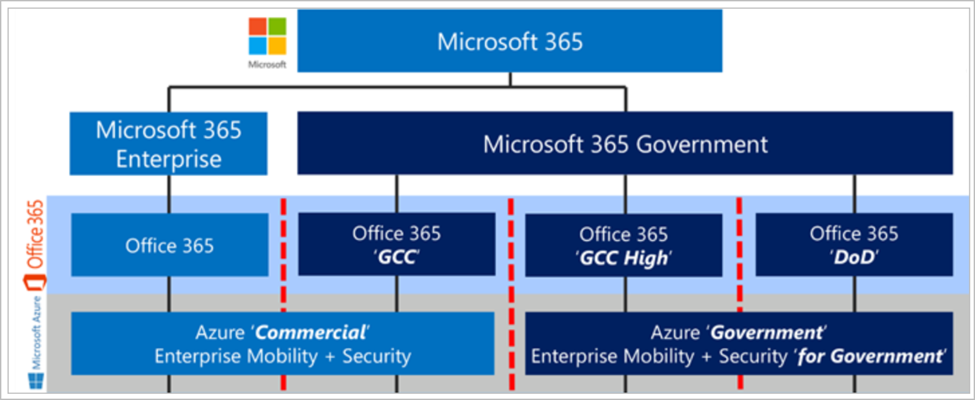
Organizations that work with U.S. government contracts or handle sensitive regulated data often face tough decisions about their cloud strategy. Two common approaches for meeting requirements are migrating all users to a dedicated Microsoft GCC High tenant or creating a secure enclave and migrating only select users. This blog post explores the differences between these two strategies, highlighting the pros and cons of each so you can make an informed decision for your organization.
What Is GCC High?
Microsoft GCC High (Government Community Cloud High) is a dedicated cloud environment designed specifically for U.S. government agencies and contractors that must comply with strict regulatory standards, such as FedRAMP High, ITAR, and DFARS when handling controlled unclassified information (CUI). GCC High provides enhanced controls, data residency in the continental United States, and a dedicated infrastructure that separates government data from commercial environments.
What Is a Secure Enclave?
Read More
Overview
Microsoft Fabric has been steadily transforming the data landscape with its unified analytics platform. One of its most powerful components, Fabric Data Agents, enables organizations to automate data workflows, orchestrate pipelines, and manage complex data operations with ease. Now, with these Data Agents being consumed into Microsoft 365 Copilot, the game changes entirely. This integration bridges the gap between enterprise data and everyday productivity tools, making insights more accessible and actionable than ever before.
More than 28,000 customers are already leveraging Microsoft Fabric, including 80% of the Fortune 500. This adoption underscores the trust and scale behind the platform and now, bringing that capability into Copilot amplifies its impact across the enterprise.
Key Points
Read MoreWhy Relying on Native Microsoft 365 Protection Isn’t Enough
As more organizations transition to Microsoft 365 (M365) for email, collaboration, and file storage, it’s easy to assume that your data is fully protected in the cloud. However, relying solely on Microsoft’s native capabilities could leave your business vulnerable to data loss, human error, and cyber threats. In this blog post, we’ll explore five compelling reasons why investing in a dedicated M365 backup solution is essential for safeguarding your business-critical information.
1. Microsoft Does Not Natively Back Up Your Data
Read MoreOverview
Organizations often rush to ingest data without considering the bigger picture. How that data will be governed, secured, and integrated across the enterprise. This approach leads to fragmented environments, compliance risks, and operational inefficiencies. A data landing zone solves this by providing a structured, strategic foundation for your entire data architecture.
A landing zone is not just a storage bucket or a raw data layer. It is a comprehensive framework that defines governance, networking, security, and operational standards before any data enters your environment.
What Is a Data Landing Zone?
Read More
Overview
Modernizing a data pipeline isn’t just about adopting the latest technology, it’s about choosing the right foundation for your data. File formats play a critical role in performance, scalability, and governance. Two widely used formats in modern data lakes are Parquet and Delta. While Parquet is a columnar storage format optimized for analytics, Delta builds on Parquet by adding transactional consistency and metadata management. Understanding how they work together and when to use each is key to designing a future-ready architecture.
Key Considerations: Parquet vs Delta
Read MoreOverview
Modernizing a data pipeline isn’t just about adopting the latest technology, it’s about aligning your architecture with your business goals. Before jumping into advanced platforms or AI-driven solutions, start by asking the right questions. What do you want to achieve with your data? How is your data structured? What governance requirements do you have? These fundamentals will guide you toward a solution that is scalable, secure, and future-ready.
Key Considerations for Modernization
Read More
Overview
In today’s data-driven world, it’s easy to get caught up in advanced architectures and cutting-edge tools. But before diving into complex solutions, understanding the fundamentals is critical. One of the most important distinctions in data processing is Batch vs Streaming (Real-Time). These two paradigms define how data moves, how it’s processed, and ultimately how insights are delivered.
Batch processing has been the backbone of analytics for decades, enabling organizations to process large volumes of data at scheduled intervals. Streaming, on the other hand, focuses on processing data as it arrives, delivering insights in real time. Both approaches have their place, and knowing when to use each is essential for building efficient, cost-effective, and scalable solutions.
In this article, we’ll break down what batch and streaming mean, how they work, and why understanding these basics is the foundation for any modern data strategy.
How It Works: Batch vs Streaming
Read MoreSubscribe to Daymark Insights
Latest Posts
Browse by Tag
- Microsoft (81)
- Cloud (70)
- Azure (53)
- Cole Tramp's Microsoft Insights (51)
- Security (48)
- Data Protection (43)
- Data Governance (38)
- Microsoft Fabric (35)
- AI (33)
- Partners (33)
- Compliance (31)
- Data Center (30)
- CMMC (27)
- Backup (26)
- Daymark News (23)
- Storage (22)
- GCC High (19)
- Veritas (18)
- Virtualization (18)
- Cybersecurity (17)
- Featured Gov (16)
- Government Cloud (16)
- Azure AI Foundry (15)
- Cloud Backup (14)
- Disaster Recovery (14)
- Managed Services (13)
- Industry Expertise (9)
- Copilot (8)
- NIST SP 800-171 (7)
- Hybrid Cloud (6)
- Networking (6)
- Power BI (4)
- Pure Storage (4)
- Reporting (3)
- Services (3)
- AI for Defense (2)
- Cloud Security (2)
- Copilot (2)
- Everpure (2)
- GDPR (2)
- Microsoft Purview (2)
- Apple (1)
- CMMC 2.0 Requirements (1)
- FedRamp AI (1)
- Mobile (1)
- Power Automate (1)