

Overview
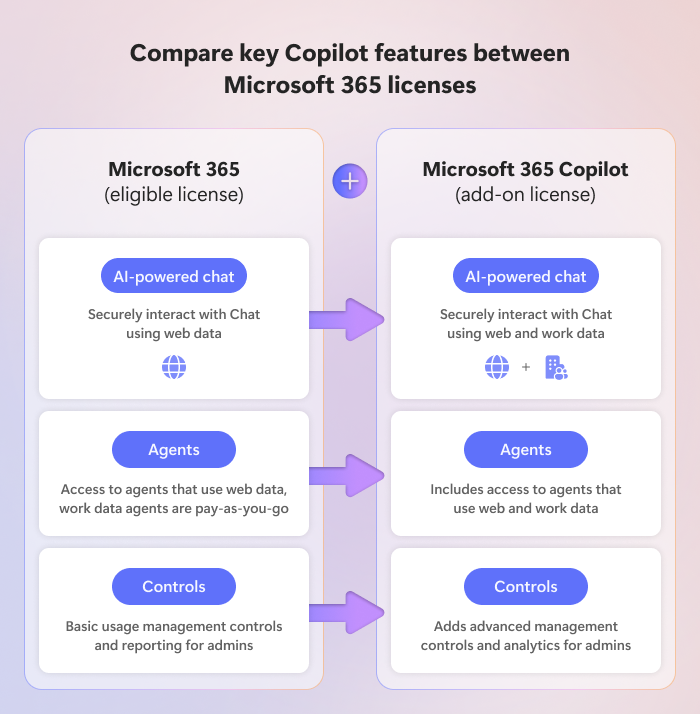
As Microsoft continues to expand its AI capabilities, organizations now have multiple ways to leverage AI within Microsoft 365. At the center of this evolution is Microsoft 365 Copilot, Microsoft's enterprise AI platform that combines large language models, Microsoft 365 applications, organizational data, and enterprise security controls to help employees work more efficiently. Depending on licensing and configuration, users can interact with AI through conversational experiences, embedded productivity tools, agents, and task automation capabilities.
Within this ecosystem, Copilot Chat and Copilot Cowork represent two different approaches to AI-driven productivity. Copilot Chat focuses on helping users find information, generate content, analyze documents, and interact with AI through natural language conversations. Copilot Cowork extends beyond conversation by performing tasks and coordinating work across Microsoft 365 services, helping users move from ideas and requests to completed outcomes.
Copilot Chat vs. Copilot Cowork
Copilot Chat
Copilot Chat is Microsoft's AI-powered chat experience that helps users research topics, summarize information, draft content, analyze files, and interact with agents. It is ideal for knowledge discovery, brainstorming, content creation, and answering questions. Organizations often view Copilot Chat as the easiest way to introduce AI into the workplace because it provides immediate productivity gains while remaining familiar and easy to adopt.
Copilot Chat is best for:
- Researching topics and gathering information.
- Summarizing documents, meetings, and content.
- Drafting emails, reports, and communications.
- Analyzing uploaded files and documents.
- Brainstorming ideas and solving problems.
- Interacting with agents and organizational knowledge sources.
Copilot Cowork
Copilot Cowork takes AI a step further by helping users execute work across Microsoft 365. Rather than simply generating recommendations, Cowork can create documents, build presentations, send emails, schedule meetings, organize files, conduct research, and coordinate multi-step workflows. Users remain in control through approval checkpoints, ensuring visibility and governance while still benefiting from automation.
Copilot Cowork is best for:
- Executing multi-step tasks and business processes.
- Creating complete deliverables such as Word documents, PowerPoint presentations, spreadsheets, and PDFs.
- Sending emails and posting Teams communications with user approval.
- Scheduling and managing meetings and calendars.
- Organizing files across SharePoint and OneDrive.
- Performing deep research and packaging findings into usable outputs.
- Automating recurring and event-driven tasks.
In many organizations, the two experiences will work together. Employees may use Copilot Chat to gather information, analyze data, or develop ideas, then leverage Copilot Cowork to create deliverables, coordinate tasks, and automate execution.
Final Thoughts
Copilot Chat and Copilot Cowork should not be viewed as competing solutions. Instead, they represent different stages of Microsoft's vision for AI in the workplace. Copilot Chat serves as an intelligent assistant that helps users learn, create, and make decisions, while Copilot Cowork functions more like a digital teammate capable of carrying out work across Microsoft 365 environments. Together, they create a powerful combination that allows employees to move seamlessly from research and ideation to execution and automation.
As organizations move beyond AI experimentation and begin operationalizing AI at scale, the conversation increasingly shifts from simply adopting AI tools to governing and controlling them. Understanding how AI assistants, agents, custom copilots, and autonomous task execution fit within existing security, compliance, and business processes will be critical to long-term success.
Let's talk about how your organization can securely deploy Microsoft 365 Copilot, Copilot Cowork, Agent 365, and custom agents built with Copilot Studio. With the right governance, security controls, and operational framework in place, organizations can maximize the value of AI while maintaining control of their data, users, and business processes.