
banner-why-daymark.jpg
Daymark IT Insights

Enterprise IT, cloud, security, and AI guidance from Daymark’s technology experts.

Microsoft Fabric Item Recovery (Soft Delete): What You Need to Know

Overview

As Microsoft Fabric environments mature and become more collaborative, the risk of accidental deletion increases. A data engineer cleaning up a workspace, an analyst removing unused assets, or a contributor misunderstanding dependencies can easily delete the wrong item. Until recently, that deletion was permanent.

Microsoft Fabric now introduces item-level recovery through soft delete, providing a critical safety net for supported Fabric items. This capability complements existing workspace retention and adds fine-grained protection at the item level.

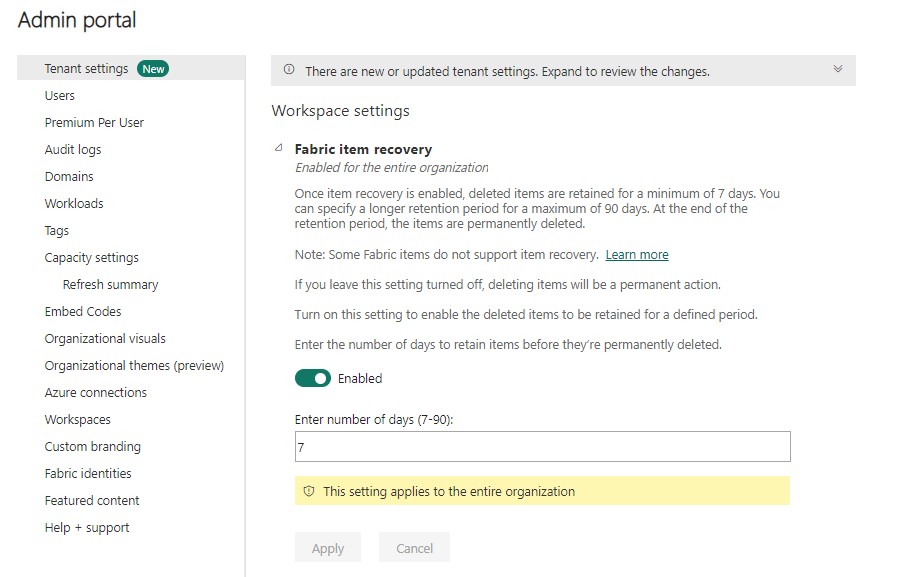
Item recovery allows deleted items to be retained for a configurable period, during which authorized users can restore them or permanently delete them. This feature is currently available in preview and must be explicitly enabled at the tenant level.

Prerequisites and Configuration

Read More
Mon, Apr 06, 2026
Share:   

Microsoft Fabric Database Hub: A Major Step Forward in Database Management

Overview

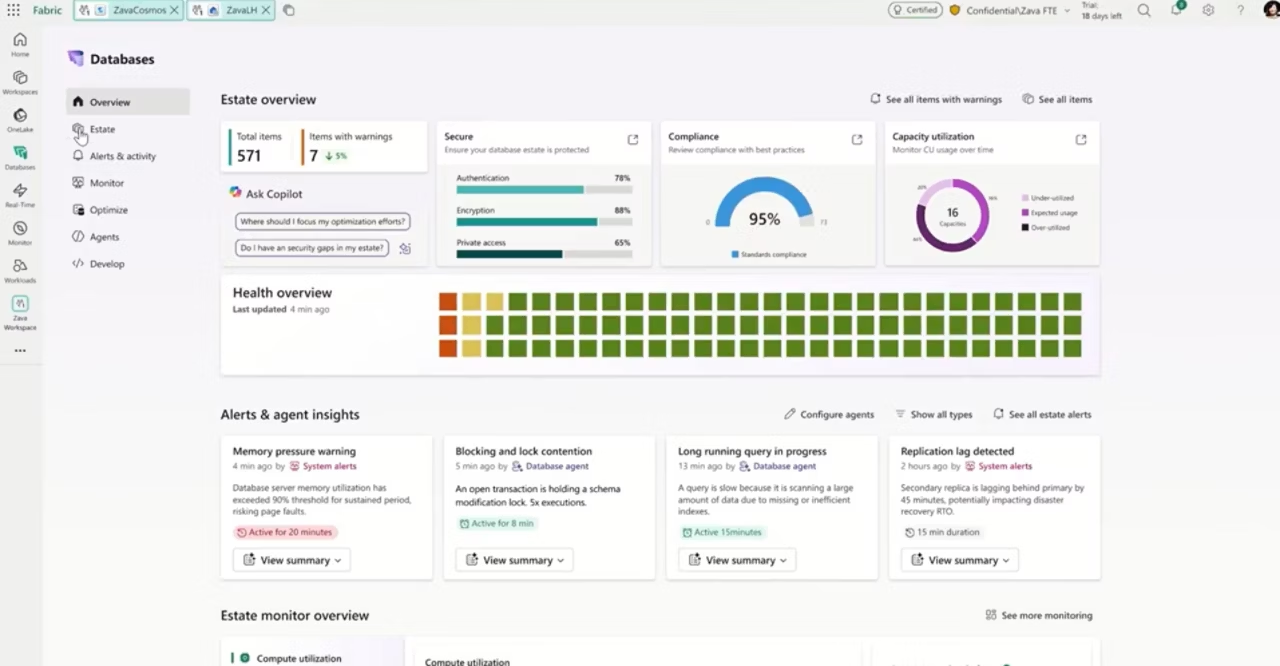
At FabCon 2026, Microsoft took another important step toward reshaping how organizations manage databases by announcing the Database Hub in Microsoft Fabric. While the Database Hub is still in early access and not yet generally available, it represents a meaningful shift in how Microsoft is thinking about database management at scale.

For years, database teams have operated across fragmented tools, portals, and management experiences depending on whether the database lived on‑premises, in Azure PaaS, or in a SaaS environment. As data estates grow and AI workloads place greater pressure on operational data, that fragmentation becomes a real problem. The Database Hub is Microsoft’s answer to this challenge, providing a unified control plane for managing databases across the enterprise from within Fabric.

Anyone running SQL Server today, whether on‑premises or in Azure, should be paying close attention. This is not just another management experience. It is a signal of where Microsoft is taking databases as part of a single, converged data platform.

What the Database Hub Is

Read More
Mon, Mar 30, 2026
Share:   

Fabric Security: Control Plane vs Data Plane

Overview

Microsoft Fabric security is built on two distinct layers that are often confused but serve very different purposes:

    • Control plane access determines what you can do in Fabric, such as creating items, managing workspaces, and sharing content.
    • Data plane access determines what data you can actually see or interact with inside OneLake.

For much of Fabric’s early life, workspace roles were used as the primary security boundary. That works for collaboration, but it becomes problematic as platforms scale and data products need stronger governance.

This is where OneLake security comes in. It introduces native, fine-grained security directly at the storage layer, allowing organizations to separate operational permissions from data access. At FabCon, Microsoft announced that OneLake security is going GA in April 2026, signaling that this model is ready to become the standard for enterprise Fabric deployments.

Control Plane Access: Workspace Roles

Read More
Mon, Mar 23, 2026
Share:   

Fabric Notebooks vs Stored Procedures in Microsoft Fabric

Overview

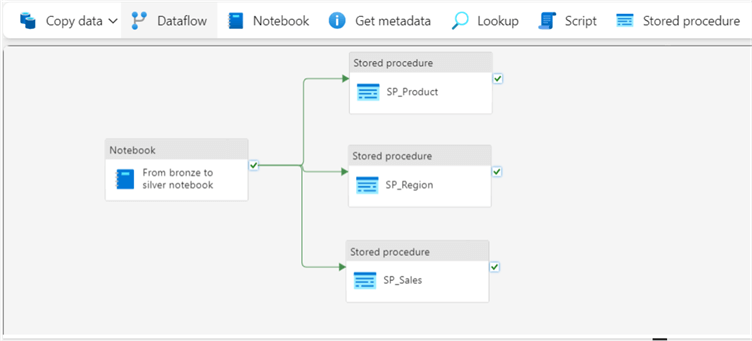
Microsoft Fabric provides multiple ways to implement transformation logic and operationalize it within Fabric Data Factory pipelines. Two of the most common approaches are Fabric notebooks and SQL stored procedures.

Both are first class tools in Fabric and both can be orchestrated through Data Factory pipelines. The difference is not about which one is better. It is about how the processing is executed, where the logic lives, and what development style best fits the workload.

Notebooks are built on Apache Spark and are designed for distributed, code driven data engineering and analytics workflows. Stored procedures run directly in the SQL engine and are optimized for relational, database centric operations. In real world Fabric architectures, it is common and often recommended to use both together.

Understanding the strengths of each helps teams design pipelines that are scalable, maintainable, and aligned with how their data is structured and governed.

Fabric Notebooks

Read More
Mon, Mar 09, 2026
Share:   

Microsoft Fabric Gateways: On‑Prem, VNet, and Streaming

Overview

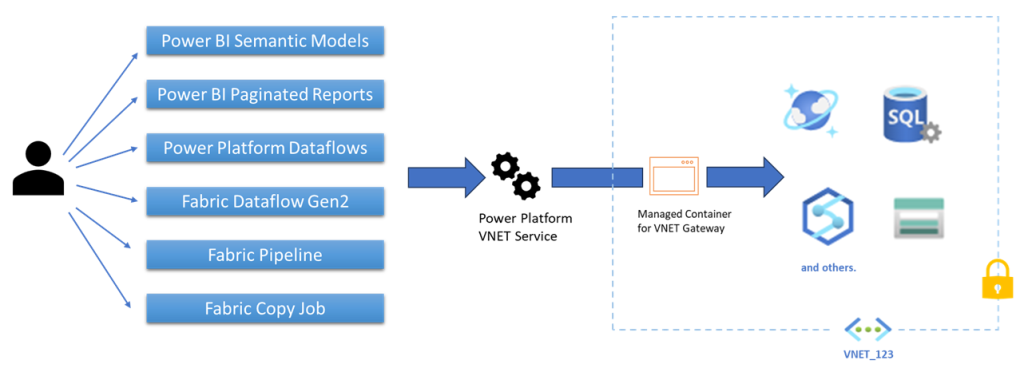
A data gateway in Microsoft Fabric and Power BI is the secure connectivity layer that allows cloud services to access data sources that aren’t publicly reachable. This includes on-premises systems, Azure resources locked behind private endpoints, and streaming platforms running inside private networks.

Gateways are critical because most real-world architectures are hybrid. Even as organizations adopt Fabric, they often need to integrate with legacy systems, tightly secured Azure services, or real-time platforms that cannot be exposed to the public internet. Gateways make this possible without compromising security or network boundaries.

Microsoft Fabric currently supports three gateway types, each optimized for a different scenario:

    • On-premises data gateway
    • Virtual network data gateway
    • Streaming virtual network data gateway

Understanding when to use each one helps avoid unnecessary complexity and ensures the right balance of security, performance, and manageability.

What a Data Gateway Does in Fabric and Power BI

Read More
Mon, Mar 02, 2026
Share:   

Azure Data Lake vs Microsoft Fabric Lakehouse: From Data Swamp to a Managed Data Platform

Overview

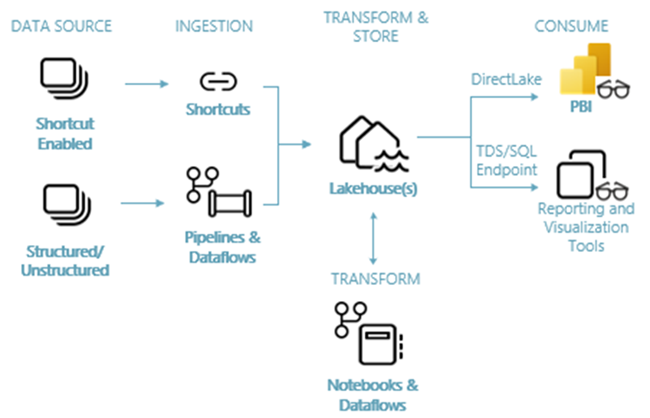
Organizations building modern analytics platforms on Azure often start with Azure Data Lake Storage Gen2 as their foundational storage layer. Azure Data Lake is highly scalable, cost effective, and flexible, making it an attractive landing zone for raw data of all types. However, without strong governance, modeling, and processing layers, many data lakes gradually devolve into what is commonly referred to as a data swamp.

Microsoft Fabric Lakehouse was introduced to address these challenges by combining the openness of a data lake with the structure, governance, and usability of a warehouse. Unlike a traditional data lake, Fabric Lakehouse is delivered as a fully managed SaaS experience that tightly integrates storage, compute, governance, security, and analytics into a single platform.

Understanding the differences between Azure Data Lake and Fabric Lakehouse is critical when designing scalable, maintainable, and business-ready data architectures.

Azure Data Lake Storage Gen2

Read More
Mon, Feb 23, 2026
Share:   

Azure Commercial vs Azure Government: What’s Different and Why It Matters

Overview

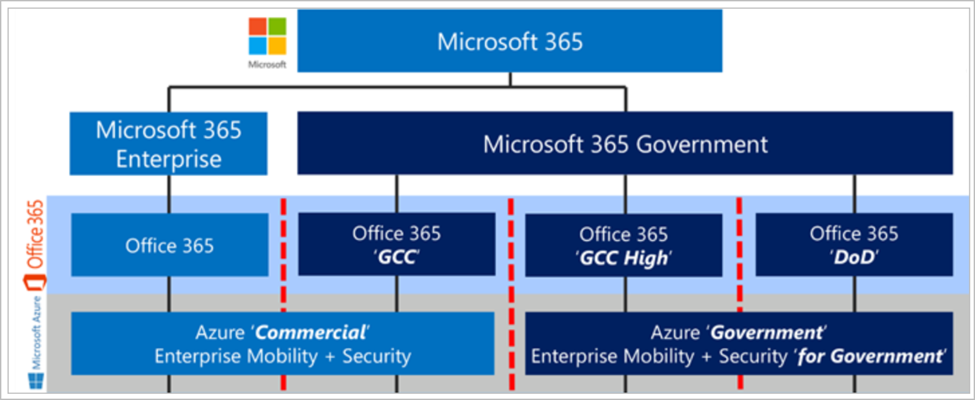
Microsoft operates multiple Azure cloud environments to support a wide range of regulatory, security, and compliance needs. Two of the most important, and most commonly misunderstood, are Azure Commercial (Public) and Azure Government. While both environments are built on the same underlying Azure technology stack, they are designed for fundamentally different use cases, particularly when paired with Microsoft 365 offerings such as Commercial, GCC, GCC High, and DoD.

Azure Commercial, also referred to as global or public Azure, is Microsoft’s standard cloud platform used by enterprises worldwide. It offers the broadest service catalog, the fastest access to new features, and global regional availability. Both Microsoft 365 Commercial tenants and GCC (Government Community Cloud – Moderate) tenants rely on Azure Commercial as their underlying Azure platform.

Azure Government, by contrast, is a separate, sovereign cloud built exclusively for U.S. government agencies and their authorized partners. It operates in physically isolated U.S. datacenters, is managed by screened U.S. persons, and is authorized for high‑impact government workloads. This separation is not merely contractual or logical; it is enforced across the infrastructure, network, and identity layers.

Because of these enforced boundaries, Azure Government is the required Azure platform for organizations using Microsoft 365 GCC High or Microsoft 365 DoD. Both of these Microsoft 365 environments are paired with Microsoft Entra ID in Azure Government, ensuring identity, data residency, and access controls remain within the same sovereign cloud boundary.

Comparison: Azure Commercial vs Azure Government

Read More
Mon, Feb 16, 2026
Share:   

Azure Cosmos DB vs Azure SQL Database: Understanding the Right Fit for Modern Cloud Architectures

Read More
Mon, Feb 02, 2026
Share:   

GCC High Tenant vs. Secure Enclave

Comparing Common Approaches to GCC High Migration

Introduction

Organizations that work with U.S. government contracts or handle sensitive regulated data often face tough decisions about their cloud strategy. Two common approaches for meeting requirements are migrating all users to a dedicated Microsoft GCC High tenant or creating a secure enclave and migrating only select users. This blog post explores the differences between these two strategies, highlighting the pros and cons of each so you can make an informed decision for your organization.

What Is GCC High?

Microsoft GCC High (Government Community Cloud High) is a dedicated cloud environment designed specifically for U.S. government agencies and contractors that must comply with strict regulatory standards, such as FedRAMP High, ITAR, and DFARS when handling controlled unclassified information (CUI). GCC High provides enhanced controls, data residency in the continental United States, and a dedicated infrastructure that separates government data from commercial environments.

What Is a Secure Enclave?

Read More
Thu, Jan 15, 2026
Share:   

5 Reasons to Leverage a M365 Backup Solution

Why Relying on Native Microsoft 365 Protection Isn’t Enough 

As more organizations transition to Microsoft 365 (M365) for email, collaboration, and file storage, it’s easy to assume that your data is fully protected in the cloud. However, relying solely on Microsoft’s native capabilities could leave your business vulnerable to data loss, human error, and cyber threats. In this blog post, we’ll explore five compelling reasons why investing in a dedicated M365 backup solution is essential for safeguarding your business-critical information.

1. Microsoft Does Not Natively Back Up Your Data

Read More
Thu, Jan 08, 2026
Share: